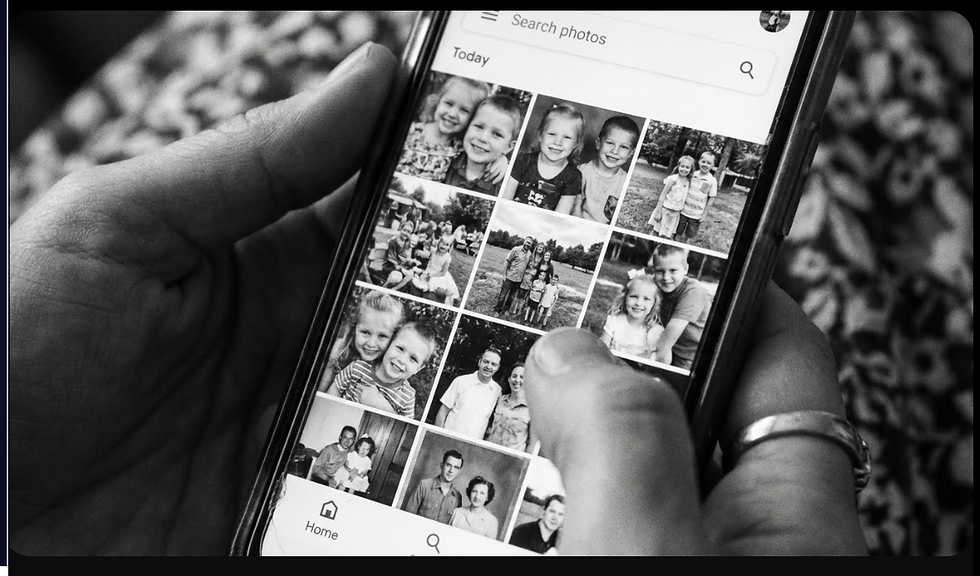
Last week we explored AI planning assistants. This week: the AI that's been organising your photos without you realising.
How 'Linda' Found 200 Photos of Her Grandchildren in 10 Seconds (And You Can Too)
By Vivienne | Tech Tuesday
'Linda' lives near Pummery Square. She has 3,000 photos on her phone. Mostly of her Grandchildren, Poundbury walks, Holidays and accidental screenshots. Her grandson asked: "Nan, can you send photos of me from when I was little?
"Linda panicked. Scrolling through 3,000 photos would take hours. She'd never organised them into albums. Some were backed up to iCloud, some weren't. Total chaos.
Then her daughter said: "Just search for his name in Google Photos Mum."Linda didn't know you could do that.
The Magic: Google Photos AI
Note: To recognise people you need to have enabled the 'Face grouping' feature so you have access to a folder called 'People & Pets'. This takes a little time but in the background. Then you can label people in your photos, it takes a few minutes to label the faces of the people closest to you, then leave google to analyse your library in the background:
Search - 'How do I ensure my google photos can find people' for a full guide on what you need to do.
Google Photos (free app, on iPhone or Android) uses AI to: Recognise faces automatically, Identify objects, places, events, Let you search like you're asking a person
Linda opened Google Photos, typed in her grandson's name in the search bar.
Every photo of him appeared. 247 photos. From newborn to now. Instantly. She nearly cried. "I thought I'd lost half of these.
"What You Can Search For (It's Bonkers)
People: Type a name → AI finds every photo of that person. Works even if they've aged (baby photos to adult photos)
Places: "Poundbury" → All photos taken in Poundbury"Beach" → Every beach photo, anywhere, ever
Things: "Dog" → All dog photos (even if not your dog)"Birthday cake" → Every birthday cake you've photographed"Flowers" → Garden photos, bouquets, wildflowers
Events: "Christmas" → AI recognises decorations, wrapping paper"Wedding" → Finds formal clothes, churches, celebrations
Dates: "June 2023" → Everything from that month"2020" → That entire year Linda tried "Poundbury Market." Found 60 photos she'd taken at the Dorset Farmers Saturday markets over two years. She didn't remember half of them.
The Scary-Clever Bit: It Learns Faces
Google Photos asks: "Is this [Name]?"You confirm a few times. Now it knows that person forever. Linda confirmed her grandson in 5 photos. Google Photos found him in 242 more, including:Blurry background shots, Side profiles, Baby photos (AI recognised face features aging)No manual tagging. No organising. AI just... knows.
How Linda's Using This Now
Creating Albums Instantly: Searched "grandson by name" → Select all → Create album → Then shared the link with her daughter, five minutes total.
No organising beforehand.
Finding Specific Memories: Searched "Christmas 2022" → Found photos she wanted to print to frame
Reliving Poundbury Moments: Searched "Great Field" → All her lovely walk photos appeared
The Setup (Takes 5 Minutes)
Step 1: Download Google Photos app (free)
Step 2: Let it backup your photos (uses WiFi, storage is free for up to 15 Gigabytes (GB), but you can buy more.) Remember to find people you need to enable 'face grouping' and label people, as noted above, it's easier than you might think.
Step 3: Wait as AI analyses your photos (happens in the background, takes few hours)
Step 4: Search for anything
Privacy Question Everyone Asks"Is Google looking at my photos?"AI runs automatically—it's not humans looking. Google uses this to improve AI, but your photos aren't seen by staff unless you report abuse.You can:Turn off face recognition (In Settings)Stop backup at any time. Delete everything from Google servers. But if you use any cloud backup (iCloud, Google, Amazon), they're all doing similar AI analysis.
The Alternatives:
Apple Photos - iPhone users have similar search capability in Apple Photos:Searches work similarly (people, places, things)Stays on your device (more private)iCloud backup has a cost after 5GB
Amazon Photos - Has less robust search capability than Google Photos, but has free unlimited storage for Amazon Prime members.
Poundbury Use Case - Linda's now the family photographer. When relatives visit, she searches "2024" + their name, finds photos, shares albums. Her grandson's school asked for baby photos for a project. Linda found them in 30 seconds.
"I used to think I was terrible at organising photos," Linda says. "Turns out I didn't need to. AI organised them for me the whole time."
Your Turn. What photos have you "lost" in your phone's camera roll? Email tech@lovepoundbury.org with what you wish you could find easily.
Next week: How Your Phone Can Write That Awkward Email You've Been Putting Off